Showing posts with label mobile apps. Show all posts

Sunday, March 24, 2013

Gaming Apps to Unlock Video Archive Footage

One of the leading digital media foundations in the San Francisco Bay Area, GAFFTA, the Gray Area Foundation for the Arts, held a hackathon for film-makers and developers March 21-23, 2013. The challenge was to come up with new uses for open-source video archive footage (for example from the Internet Archive).

One idea would be to merge mobile gaming, crowdsourcing, and video archives to make the archives a fun and accessible tool for telling new stories. Here are some app ideas:

App: This is not my story!
In this gaming app, person 1 (whose image or profile photo is shown) selects a video micro-clip that he or she feels is ‘not my story.’ Then person 2, matched randomly from the crowd of the app’s community members, adds a short caption to the video as to why the video micro-clip is not that person’s story. Humor would be tantamount. Other community crowd members could validate the caption (e.g.; police spam), and vote on it with ‘likes’ to determine game winners.

App: PostSecret Video
This gaming app is the video version of the successful, strikingly poignant, and deeply human PostSecret project. PostSecret is an ongoing community art project where people mail in their secrets anonymously on one side of a homemade postcard which are then posted on the web and compiled and published as books. Instead of sending anonymous postcards with ‘my secret,’ anonymous participants would find a video micro-clip that corresponds to their secret. Other community members would guess what the secret is from the video micro-clip.

App: Exquisite Video Corpse Again taking advantage of the community to create crowd art, this gaming app uses the exquisite corpse technique invented by the surrealists. In a group story telling exercise, the first person selects a video micro-clip. The second selects a second video micro-clip that is the next few frames of the story. The third selects the third, and so on. Each new person selecting can only see the story 1-2 nodes back. Again the crowd could vote on newly created video stories.

Sunday, May 08, 2011

App fever at Mobile Health 2011

This year’s attendance was double last year’s at the Mobile Health conference, held at Stanford University May 4-5, 2011. The main theme last year was monetizing mobile health apps, without any real ideas of how to do so. This year the main theme was app fever – everyone either having or thinking that they need to have an app. No one seemed to be immune - large and small health service providers, physician groups, insurers, and entrepreneurs alike are scrambling to launch apps.

Rather than having each organization struggle through multi-platform app development,

what is needed is the GeoCities of mobile apps,
a plug and play platform where app creators can select different widgets for app customization. The most obvious mobile health app widgets would be for appointment scheduling, prescription management, lab test results, physician interaction, and EMRs.

Since app fever reaches far beyond the health sector, GeoCities/Dreamweaver-level platforms, much more accessible to the layperson than Google App Inventor and unified mobile code base tools, could cause even greater activity in the already booming mobile sector.

Sunday, January 16, 2011

Android mobile app for 23andMe data

DIYgenomics released a personal genome Android app update on January 9, 2011 adding three new elements of functionality: the ability to upload and store 23andMe data in the app, multiple views for health risk, drug response, and athletic performance (Figure 1), and a quality ranking system for each SNP.

Figure 1: DIYgenomics Android mobile app view categories.


What is this information?
Selecting any item displays a list of variants or SNPs (places of potential genetic typos), such as for Alzheimer's disease (Figure 2). The locus, gene and variant (SNP) details are shown, along with the normal type (e.g.; no mutation) for 23andMe data (if it exists) in black, an individual's 23andMe data (if loaded) with normal alleles in green and mutations (polymorphisms) in red. Stars (from 1-5) indicate the research quality of the SNP (per the journal ranking of the study, the number of cases and controls, etc.). The colored blocks show which service providers cite the SNP (per color legend), and how many studies they cite.

Figure 2: DIYgenomics health condition Alzheimer's disease.


What does this information mean?
In Health Conditions, a mutation (polymorphism) presented in red generally indicated being at higher potential risk for developing a condition. In Drug Response, a mutation could mean that the normal dose of the drug may not work as well, that there could be side effects, or that there could be a higher change of addiction (for substances). In Athletic Performance, the favorable mutation (green), suggests greater than average athletic capability.

Sunday, June 20, 2010

Crisis telediagnosis mobile app demo

Technology-driven tools are evolving so that crisis response can be more participatory, and have more advance preparedness. A demo of the Triage4G mobile app (Android and web platforms) occurred at the Clear 4G WiMAX Developers Symposium held at Stanford University, June 15, 2010. The Triage4G app features live video-conferencing and real-time matching between first responders/crisis victims and remote physicians for telediagnosis. (Application download)

Figure 1. Crisis telediagnosis: real-time matching of first responders/victims and remote physicians for live streaming video telediagnosis


Figure 2. Screenshots - a first responder launches the Triage4G app and inputs Triage Tag data. GPS information is use to create case number. A real-time remote physician match is requested.

Figure 3. Screenshots - a physician receives SMS notification of a patient requesting telediagnosis and logs in to the Triage4G app via smartphone or desktop.

Figure 4. Screenshots - when the match is complete, the first responder's screen updates with the case number and a button to launch Qik. The doctor's screen updates to the first responder's Qik page and then the live video steam begins.

Sunday, April 04, 2010

Mobile app concept: Disaster Telediagnosis

Disaster Telediagnosis is a mobile app idea that takes advantage of the bandwidth and mobility of 4G. It is a massively scalable peer-to-peer clearinghouse application providing live streaming video communication between people injured in a crisis situation and remote physicians for diagnosis and ongoing support until hand-off to local health authorities.

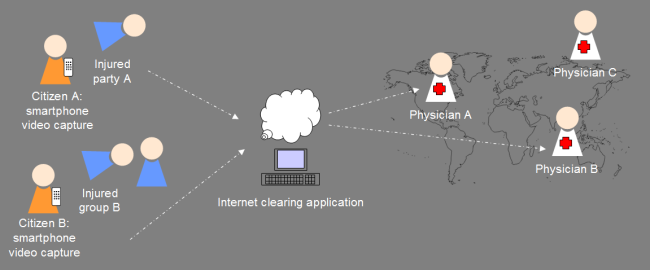
Whenever an injured party needs to interact with a physician, anyone with a smartphone can take a picture or stream live or archived video coverage to the internet clearinghouse to be connected in real-time with any available physician worldwide. There may be multiple interactions between patient and physician, both of whom are mobile, over the course of the case, and continuity can be preserved through high-bandwidth video connectivity. The internet clearinghouse could provide language matching or automated translation, and would log all calls based on GPS and other tagging attributes. Remote physicians could review and annotate patient electronic medical records, and the archived video files would provide patient history.

Figure 1: Disaster Telediagnosis
Any citizen with smartphone video capture could record injured parties describing their conditions, or otherwise document the status of the injured or dead. Video is streamed to the internet clearing application and on to available physicians, possibly with specialized language capabilities.

This application concept is accepted for presentation, if a demo can be realized, at the Clear 4G Symposium at Stanford in Palo Alto, CA, June 15, 2010; any interested developers and collaborators please contact the author.

Thursday, October 26, 2006

Need more widgets – Starbucks Mobile

The Internet is really going to explode when web widgets, badges, open APIs, mash-ups, etc. expand out of the Web 2.0 eco-structure bubble and into the mainstream web and onto the fledgling US mobile computing platform.

A beautiful marriage of smart-phone users and the sanctioned addiction to caffeine would be going to mobile.starbucks.com on the way to the coffee bar.

At mobile.starbucks.com:

1) Tap one of the icons indicating a pre-saved drink combination, e.g.; short decaf soy white mocha no-whip (who wants to say that everyday anyway!) or enter a new beverage combination

2) Tap an icon for one of the pre-saved store locations or select a quick-load nearest store-finder

3) Tap to pay via pre-approved bank or credit card auto-debit.

4) Arrive to coffee bar and pick up drink.